
EAM / CMMS
Preventive Maintenance
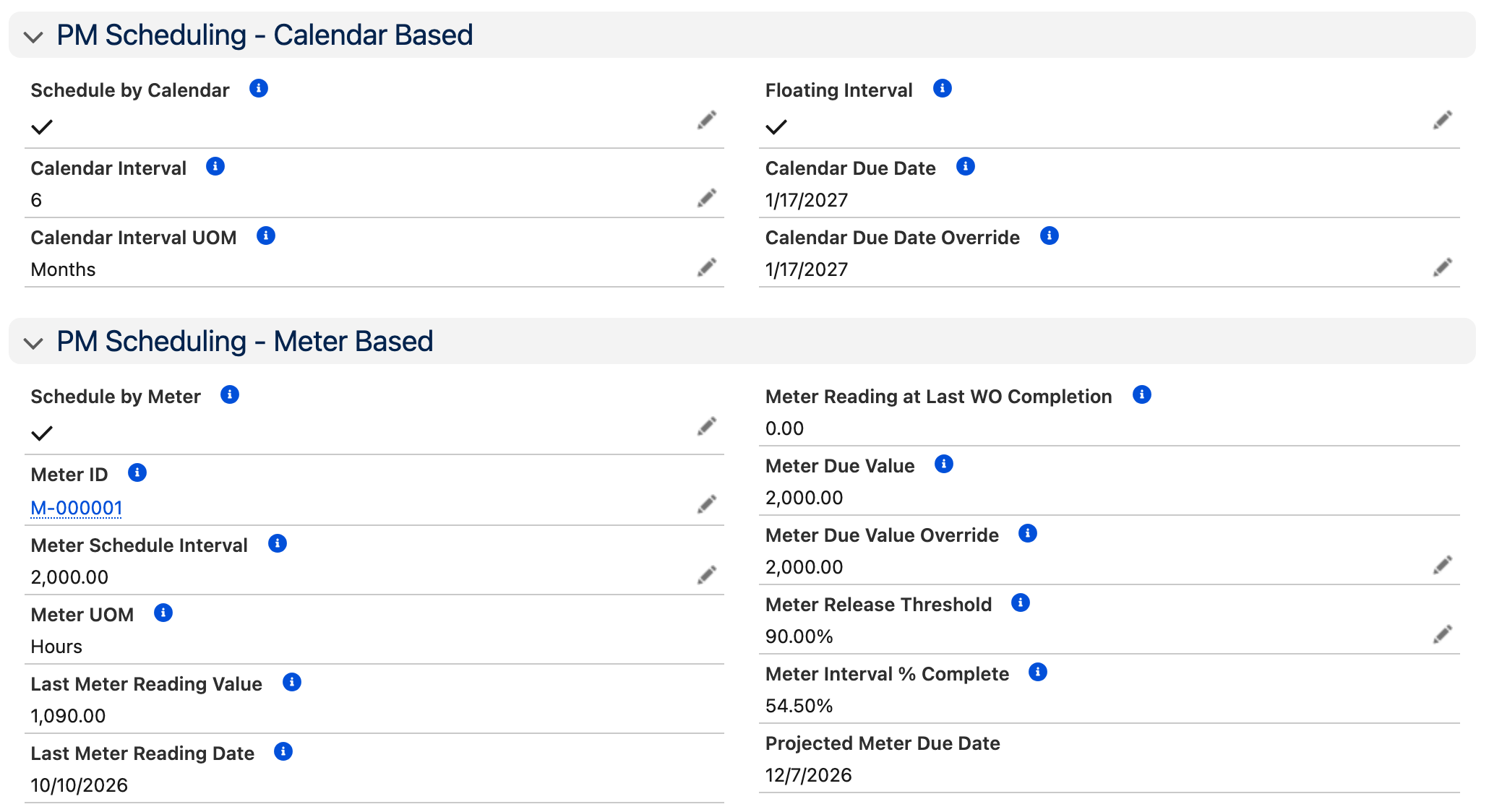
Automate PM schedules based on calendar intervals, meter readings, or both. The system releases work orders automatically with planned tasks, parts, and instructions already attached. Hierarchical group scheduling prevents duplicate work orders, and every completed PM resets the schedule for the next cycle.
Key Capabilities
Calendar & Meter Scheduling
Schedule PMs by time interval, meter reading, or a combination of both. Fixed or floating intervals adapt to your operations.
Model Work Orders
Define reusable templates with common parts, labor estimates, and detailed work instructions. New PM work orders inherit everything.
PM Group Scheduling
Hierarchical parent/child schedules that suppress overlapping cycles. When the annual PM fires, the monthly and quarterly cycles that fall on the same date are suppressed to prevent duplicate work orders.
Automatic Release
PM work orders release automatically based on configurable release windows. Specify how many days in advance of the due date to release.
Revision Control
Track changes to PM schedules over time. Know who changed what, when, and why.
Projected Costs & Labor
Forecast planned labor hours and PM costs across your sites. Plan resources before work orders release.
How It Works
Each PM schedule runs as a cycle: define the work once, and the system releases and resets it.
Define Model Work Order
Create a template with planned tasks, parts, labor estimates, and detailed instructions. This becomes the blueprint for every PM work order the schedule generates.
Set the Schedule
Choose calendar-based (fixed or floating), meter-based, or combined triggers. Set the interval, release window, and completion offset.
Automatic Release
When the PM comes due, the system generates a work order from the model, complete with tasks, planned stock, and predefined assignments.
Execute & Complete
Technicians execute the work, log time and materials, and close the work order. Actual costs roll up against the plan.
Schedule Resets
On completion, the next due date is calculated automatically based on the schedule type. The cycle continues without manual intervention.
Who Is This For?
Reliability Engineers
Define PM strategies that reduce unplanned downtime and extend asset life. Analyze PM effectiveness with plan vs. actual data.
Maintenance Managers
Ensure PM compliance across your sites. Know which schedules are current, overdue, or approaching their release window.
Compliance Officers
Automated scheduling and electronic work records satisfy regulatory requirements for FAA, OSHA, EPA, and Joint Commission audits.
Planners
Forecast labor and parts requirements weeks in advance of PM release. Coordinate PM work with production schedules and crew availability.
Good Fit If You...
- Run recurring maintenance on a time or usage basis
- Need automated work order generation from PM schedules
- Want hierarchical PM schedules that suppress overlapping cycles
- Require compliance documentation for regulated environments
- Track PM costs and labor to measure program effectiveness
"One of the best features is the PM Schedules. This module will help you set up a PM frequency that works for the asset or equipment based on any type of time or recommended schedule in existence. You can set PMs to release weekly, monthly, quarterly, semiannual, annual, dynamic, or any other way you can think of."
Facilities Maintenance Manager
Want to see preventive maintenance in detail? Watch the full training walkthrough →
See Preventive Maintenance in Action
Try AssetOptics free with demo data. No commitment required.