
EAM / CMMS
MRO Procurement
Run MRO purchasing from requisition to receipt, in the same system as your inventory and work orders. When stock falls below minimum levels, the system generates purchase requisitions automatically. Approval workflows enforce spending policies, and because vendors are stored as Salesforce Accounts, your procurement data connects naturally with service history, contracts, and relationship data.
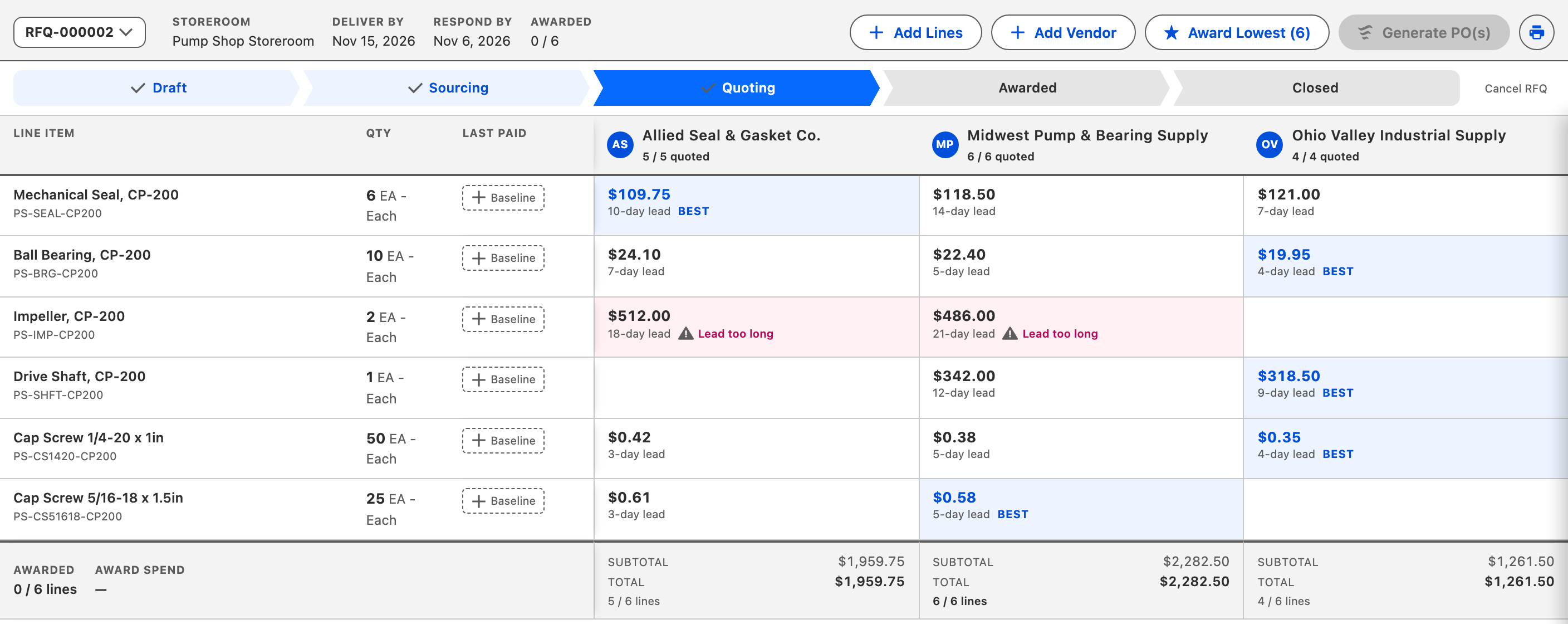
Key Capabilities
Automated Requisitions
System-generated requisitions for stock items based on minimum stocking quantities. No manual reorder monitoring required.
Approval Workflows
Criteria-based approval processing ensures adherence to your organization's procurement policies and spending limits.
Consolidated Ordering
Combine multiple requisitions into a single purchase order for release. Reduce procurement overhead and vendor transactions.
Stock & Service Lines
Support both stock items and service-based line items on the same purchase order for complete procurement coverage.
One-Click Receiving
Receive all open PO lines with a single click, or receive individual lines with direct issue to work orders upon receipt.
Vendors as Accounts
Vendors are standard Salesforce Accounts, so procurement, service history, and relationship data connect naturally with no sync layer.
How It Works
A purchase moves from identified demand to stock on the shelf in four steps.
Demand Identified
Inventory falls below minimum stocking quantity, or a planner identifies a non-stock need on a work order. The system generates a purchase requisition with the right quantity, vendor, and pricing.
Requisition Approved
The requisition routes through criteria-based approval workflows. Approvers review from the centralized Approval Requests tab, with no email chains required.
Purchase Order Released
Approved requisitions convert to purchase orders. Multiple requisitions for the same vendor consolidate into a single PO to reduce procurement overhead.
Received & Stocked
Parts arrive and are received against the PO, either in bulk or line-by-line. Inventory updates immediately. Serialized items create individual asset records on receipt.
Who Is This For?
Purchasing Agents
Manage the full PO lifecycle from requisition to receipt. Consolidate orders, track vendor performance, and enforce procurement policies.
Maintenance Planners
Ensure parts are ordered in time for scheduled work. See vendor lead times and economic order quantities when planning work orders.
Storeroom Managers
Automatic replenishment keeps storerooms stocked without manual monitoring. Receive inventory and update quantities in real time.
Finance & Accounts Payable
Track MRO spend by vendor, storeroom, and work order type. Vendors as Salesforce Accounts means procurement data connects to contracts and invoicing.
Good Fit If You...
- Purchase MRO parts and supplies from multiple vendors
- Need approval workflows for procurement spending limits
- Want automatic requisitions driven by inventory demand
- Manage vendor-specific pricing and lead times per part
- Require procurement data connected to work orders and inventory
"We have been using AssetOptics since 2014, for all of our cooler maintenance duties. Using AssetOptics has allowed us to track the maintenance and the purchasing of products for the various pieces of equipment at each of our four facilities that we currently operate."
Maintenance Administrator
Want to see procurement in detail? Watch the full training walkthrough →
See MRO Procurement in Action
Try AssetOptics free with demo data. No commitment required.