
EAM / CMMS
Inventory Management
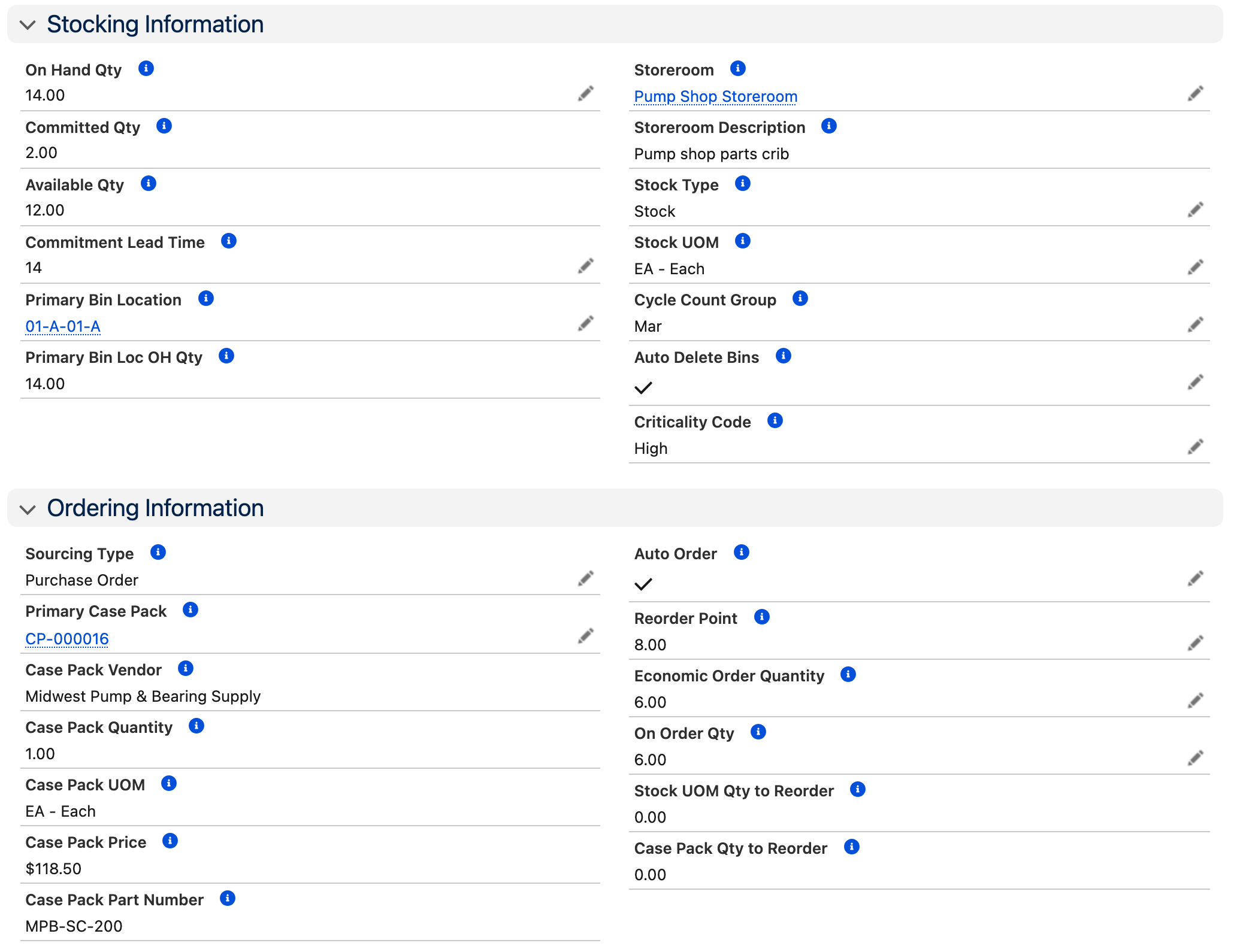
Know what you have on hand, where it's located, and what equipment it's for. Track quantity on hand, committed, and available across every storeroom and bin location. When a work order plans parts, inventory is committed automatically. When stock falls below minimum levels, replenishment triggers without manual intervention.
Key Capabilities
Multi-Site Storerooms
Manage multiple storerooms with bin locations, site-specific valuation methods, safety stock policies, and preferred suppliers.
Demand-Driven Replenishment
Automatic purchase quantity recommendations based on minimum stocking quantities, usage history, and work order demand.
Work Order Integration
Status-driven commitment processing ties inventory to work orders. Plan parts, issue stock, and track consumption automatically.
Serialized Inventory
Track repairable spares and high-value parts by serial number throughout their lifecycle, from receipt to issue to repair.
Stock Issue Requests
Technicians request parts through a controlled process. Automatically issue all planned parts to work orders in one click.
Transfer Orders
Move inventory between storerooms with full tracking. Maintain visibility across your entire supply chain.
How It Works
Parts move from the work order plan to the technician and back onto the shelf, with quantities updating at every step.
Parts Planned on Work Order
A planner adds required parts to a work order. Inventory is checked against quantity available, and stock is committed against the work order automatically.
Stock Issued to Technician
A stock issue request serves as a pick ticket. The storeroom issues parts, and quantity on hand and committed quantities update in real time.
Replenishment Triggered
When quantity available falls below the minimum stocking quantity, the system flags the shortage. A purchase requisition can be generated automatically based on economic order quantity and vendor lead time.
Stock Received & Shelved
Parts arrive, are received against the purchase order, and inventory quantities update. For serialized items, individual asset records are created on receipt.
Who Is This For?
Storeroom Managers
Full visibility into quantity on hand, committed, and available across every storeroom and bin location. Manage cycle counts, transfers, and replenishment policies.
Technicians
Request parts through a controlled process, or pick up pre-kitted materials for planned work. No hunting through storerooms or guessing what's available.
Maintenance Planners
Plan parts on work orders with confidence. See what's available, what's committed, and what needs to be ordered before scheduling the work.
Purchasing & Finance
Automated requisitions reduce manual ordering. Track inventory valuation, usage history, and vendor performance across every storeroom.
Good Fit If You...
- Manage spare parts across one or more storerooms
- Need inventory committed to work orders automatically
- Want demand-driven replenishment instead of manual reorder monitoring
- Track serialized or repairable spares by serial number
- Require multi-site inventory visibility in a single system
"The Inventory section has an easy to use warehouse, parts issuing, PO receiving, cycle counting and direct PO receiving into jobs that is easy to train personnel in the field and to audit each work order or job for details. You can use standard costing but its average costing is top notch being accurate and easy to audit."
Operations Manager
Want to see inventory management in detail? Watch the full training walkthrough →
See Inventory Management in Action
Try AssetOptics free with demo data. No commitment required.