
EAM / CMMS
Planning & Scheduling
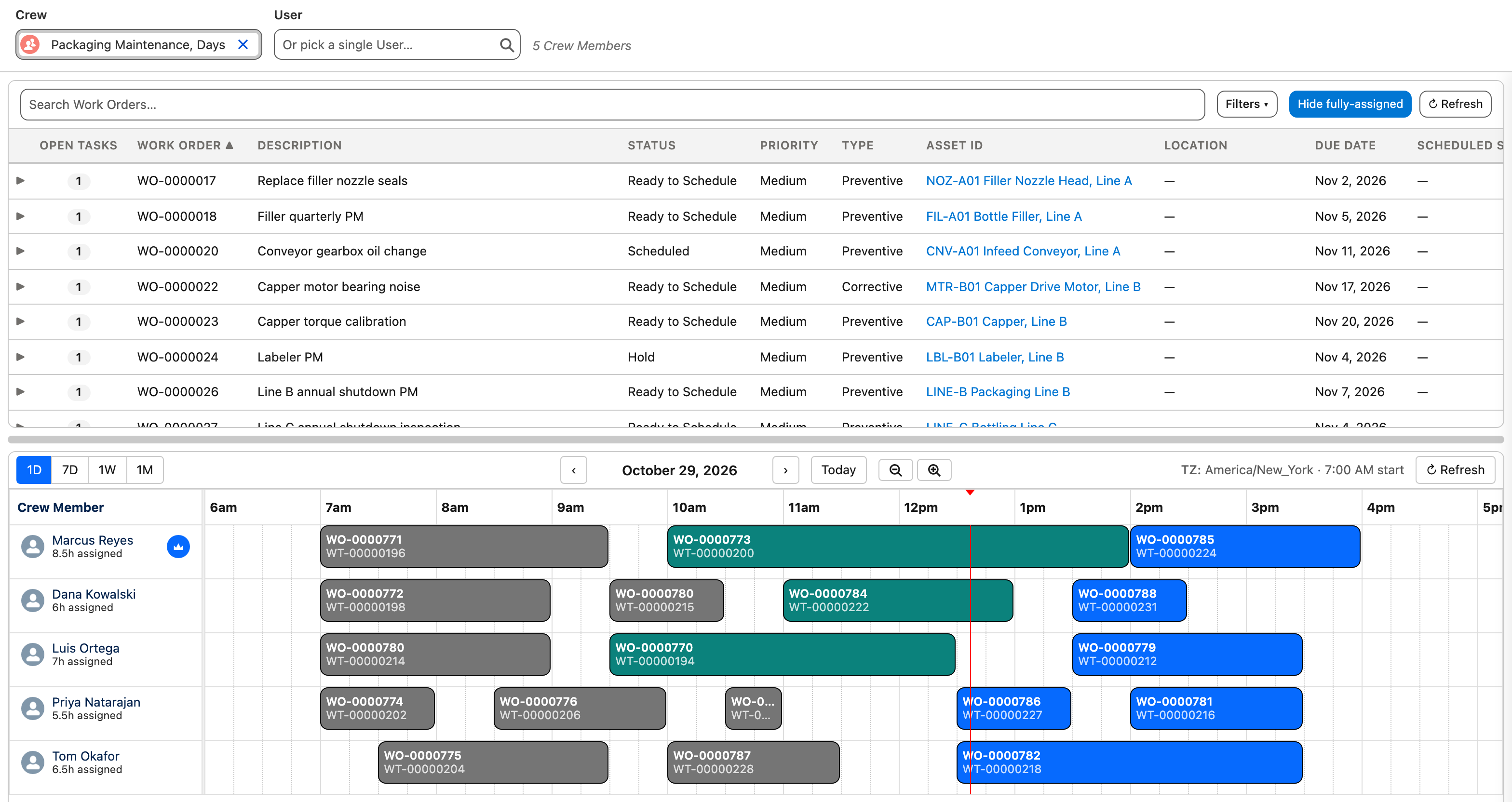
Plan the week and assign the work from one screen. The drag-and-drop dispatch console shows work tasks alongside crew availability in a visual calendar. Generate daily work lists, project future parts and labor requirements, and ensure materials are staged before work begins. Planners work from a single system instead of a whiteboard and a spreadsheet.
Key Capabilities
Dispatch Console
Drag-and-drop scheduling with a visual resource calendar. View work tasks by crew or individual across day, week, or month views.
Crew Management
Assign work tasks to crews or individuals. Manage team availability, skills, and workload balance in one place.
Parts Forecasting
Project future parts requirements from scheduled work to drive more effective MRO purchasing and inventory management.
Labor Planning
Forecast labor requirements by craft on a weekly basis. Plan the optimal mix of internal staff and contract labor.
Calendar Integration
User-specific calendars with full integration to Microsoft Outlook and Google Workspace calendars.
Multi-Craft Planning
Plan tasks by trade with duration estimates. Color-coded scheduling shows resource utilization at a glance.
The Weekly Planning Cycle
Each week the planner moves work from the backlog onto the schedule, then tracks it to completion.
Review Backlog
The planner reviews open work orders, PM schedules approaching release, and pending requests. Priority is set based on asset criticality, safety impact, and production needs.
Plan Resources & Parts
Work tasks are assigned to crafts with duration estimates. Parts are checked against inventory availability and kitted or ordered as needed.
Schedule & Dispatch
Tasks are dragged onto the dispatch console calendar, assigned to crews or individuals. The visual layout shows utilization and conflicts at a glance.
Track & Adjust
As work progresses, planners monitor completion and reassign as needed. Actual hours and materials are captured in real time, feeding next week's plan.
Who Is This For?
Maintenance Planners
Build weekly schedules with confidence. See crew availability, parts readiness, and work priority in a single view.
Supervisors
Monitor daily work assignments, track completion, and reassign tasks when priorities shift, all without spreadsheets or whiteboards.
Management
Measure wrench time, planned vs. unplanned work ratios, and resource utilization. Justify staffing decisions with real data.
Technicians
Know what's scheduled, when, and where. Access work details, parts lists, and instructions from any device.
Good Fit If You...
- Manage multiple crews or trades across maintenance work
- Need visual scheduling with drag-and-drop assignment
- Want to forecast parts and labor requirements ahead of time
- Track planned vs. actual labor hours per work order
- Coordinate maintenance scheduling with production or operations
"It covers all of our needs for maintenance planning, parts inventory and purchasing to help keep our plant running."
Operations Professional
Want to see planning & scheduling in detail? Watch the full training walkthrough →
See Planning & Scheduling in Action
Try AssetOptics free with demo data. No commitment required.