
Platform
Mobile Access
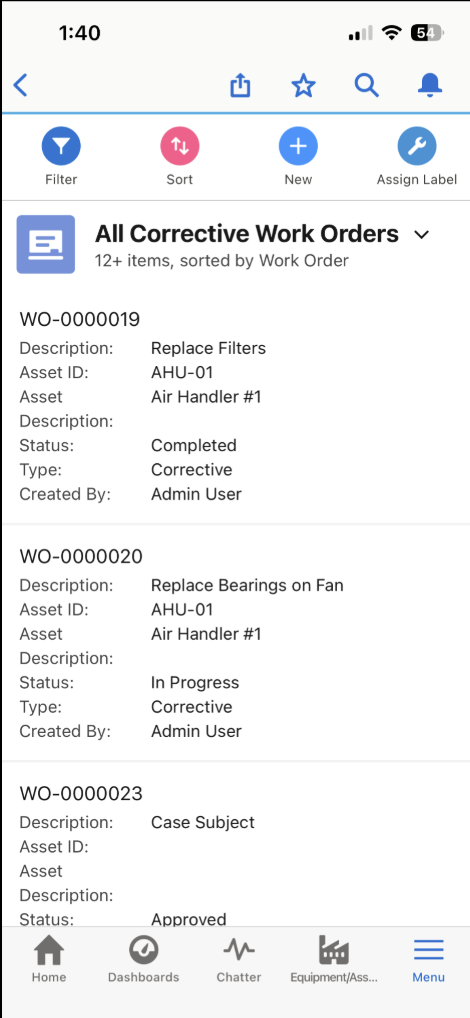
Technicians see their work orders, log time and parts, and look up asset history from a phone or tablet, in the Salesforce app they already have.
Comes with Salesforce
- Salesforce mobile app on iOS and Android
- Camera and file upload
- Notifications
- Same login and permissions as desktop
What AssetOptics Adds
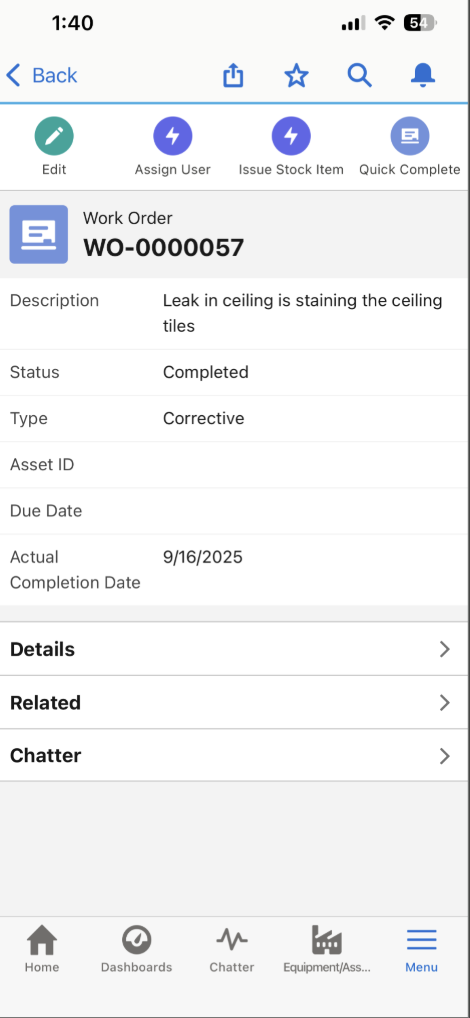
- Work order actions: edit, assign, issue stock, quick-complete
- QR code lookup for assets and stock items
- Log time and materials against tasks in real time, from the job
- Asset history and attached documents in the field
Key Capabilities
iOS and Android
Runs on the Salesforce mobile app, the same app your organization already uses. No separate mobile app to install or maintain.
Work Order Management
Browse work orders, view details, and take action from the field. Edit, assign, issue stock, or quick-complete from the phone.
Time & Materials Entry
Log labor hours and materials at the point of work. Entries go in while the job is still fresh.
Asset Lookup
Access asset information, maintenance history, and attached documents from the field. Know the full story before starting work.
QR Code Scanning
Scan QR codes to instantly pull up assets and inventory items in the field. No manual lookup required.
Photo Capture
Take photos directly from a mobile device and attach them to work orders or asset records. Document conditions found, work performed, and completed repairs for a clear audit trail.
Business Value
"The system is very easy to use. Our technicians can access all their work orders in real-time from their ruggedized laptops or their smartphones."
Facilities Management, Hospital
See Mobile Access in Action
Try AssetOptics free with demo data. No commitment required.